
How Do I Download Offline Maps for My Trip?
In Tripomatic 26, offline maps work differently than before. Instead of downloading entire regions, you download maps for your specific trip.
How to Download Offline Maps
- Open your trip
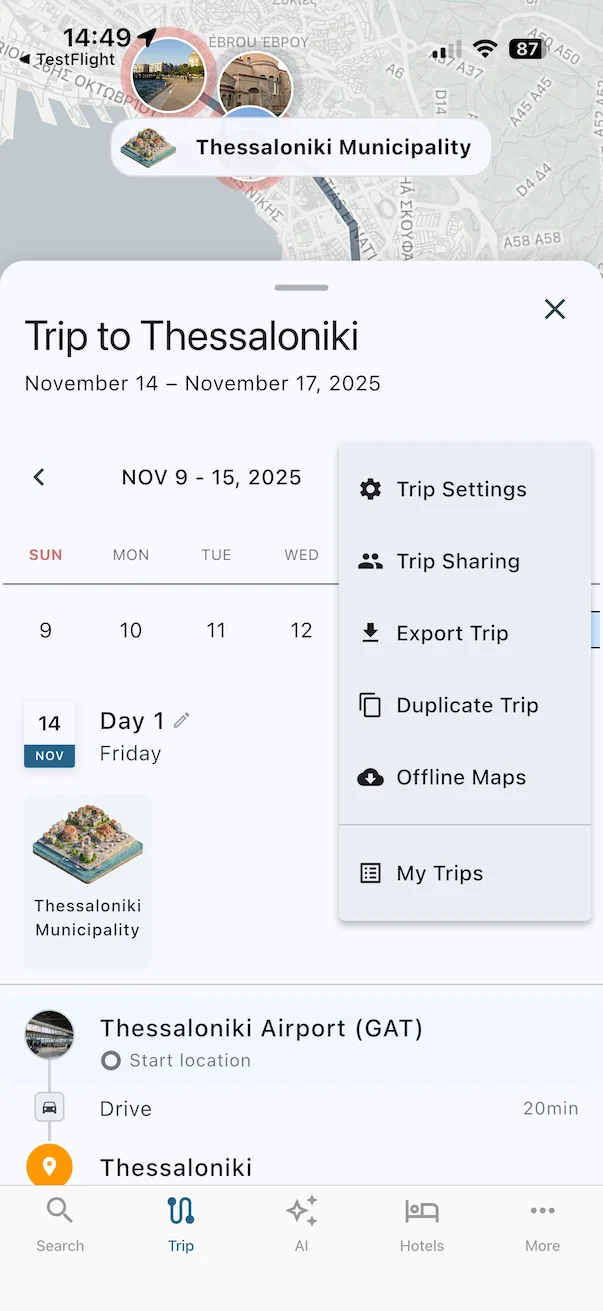
- Tap the three dots to open the Trip Menu
- Select Offline Maps and download the maps for your trip.
The download will include maps for all places in your trip, regardless of how many cities or countries it spans.
When Do Offline Maps Expire?
Offline maps expire 30 days after your trip’s end date. This helps free up storage space on your device automatically.
Can I Download Maps for a Specific Area Like Before?
No, offline maps are now trip-based. This approach saves storage space because you only download what you need for your specific trip, rather than entire regions you might not fully explore.