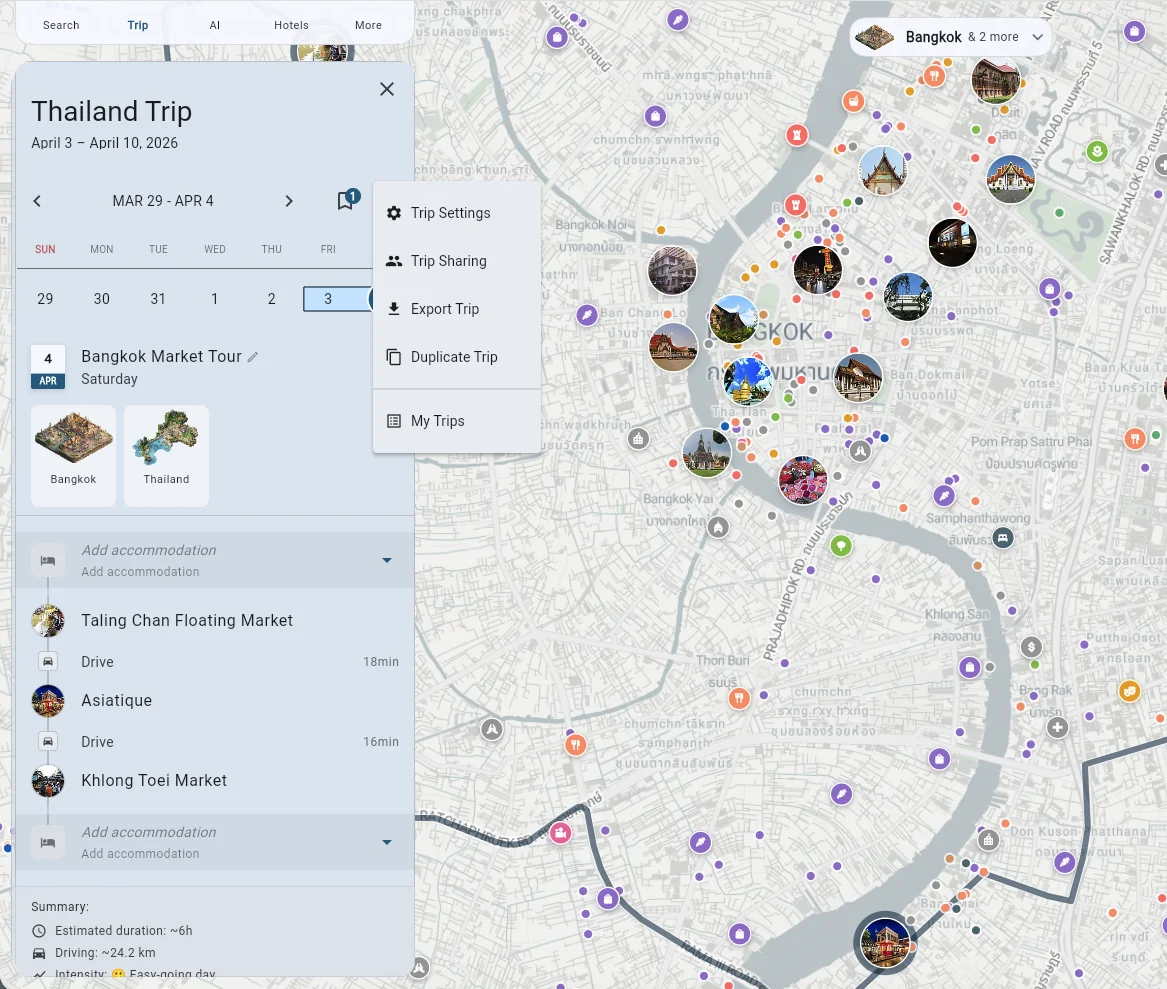
Downloading the PDF guide
Premium subscribers can export their trips as PDF guides to use offline or print.
How to Export
On mobile:
- Tap Trip in the navigation
- Open your trip
- Click on the Trip menu using the three dots icon next to the trip dates
- Select Export trip
- Select Export as PDF
- Tap Preview to view or Download PDF to save
On web:
- Open your trip at maps.tripomatic.com
- Click on the Trip menu using the three dots icon next to the trip dates
- Select Export trip
- Select Export as PDF
- Tap Preview to view or Download PDF to save
What’s Included
The PDF guide contains:
- Trip overview with dates and destinations
- Day-by-day itinerary with maps
- Place details including addresses and notes
- Accommodation information
- Your custom notes
Other Export Formats
You can also export your trip as:
- GPX - For GPS devices and navigation apps
- KML - For Google Earth and other mapping tools
Export requires Tripomatic Premium.